
If your agency is planning to move or redesign a website, you probably want to know how to do it without losing traffic from Google.
That’s exactly what this blog will cover.
Skipping proper steps during a website move can lead to broken links, lost rankings, and a drop in visitors.
In this blog post, you’ll get a full SEO website migration checklist that shows every step to protect your website during migration.
You’ll learn…
- How to map old URLs to new ones
- Set up redirects
- Keep important pages
- Check links
- Submit sitemaps
- Monitor traffic after the move
- And more
By the end, your agency will know exactly what to do so a website migration is smooth, safe, and keeps all the search traffic you worked hard to earn.
But first, let’s break down what SEO website migration means for a better understanding…
In this article
What’s SEO website migration?
SEO website migration for agencies means moving a website to a new setup without losing Google rankings or traffic.
This can happen when a site changes its domain name, design, CMS, or URL structure.
During the move, the agency makes sure all pages, links, and content still work properly. They also guide search engines so they can find the new pages easily.
If this is done the wrong way, the website may lose traffic from Google.
If done correctly, the site keeps its rankings and continues bringing visitors from search.
Now, let’s look at the checklists…
SEO website migration checklist for agencies
1. Crawl the existing website
Before moving a website, the first thing an agency does is scan the entire site to see every page that exists.
Think of it like making a full list of every room in a house before renovating it.
Tools like Screaming Frog SEO Spider or Sitebulb help do this automatically. They go through the website page by page and collect useful information such as the page titles, descriptions, links, and whether each page works properly.
Why does this matter?
Because many websites have hundreds or even thousands of pages, and it is easy to forget some of them.
If you migrate a site without knowing every page that exists, some pages might disappear. And when pages disappear, two things happen:
- Google cannot find them anymore
- And people who click old links may see an error page
By crawling the website first, the agency creates a complete record of the website exactly as it is today.
This record becomes the guide that helps them rebuild everything correctly after the migration.
2. Export all current URLs
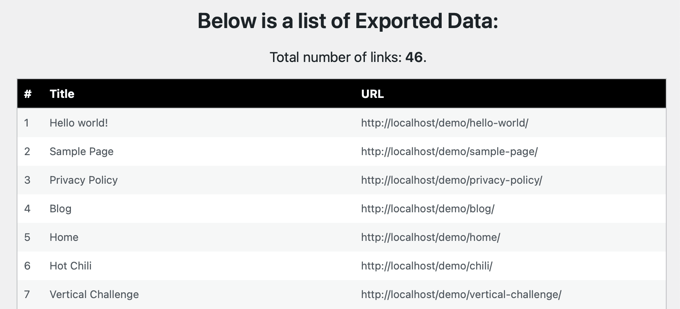
After scanning the website, the next step is to download a list of every page on the site.
Each page has its own address on the internet, called a URL. For example:
- yourwebsite.com/blog
- yourwebsite.com/contact
- yourwebsite.com/services
All these links need to be saved in a file, usually a spreadsheet. Screaming Frog SEO Spider can export this list in seconds.
Why is this important?
Because during a website migration, pages sometimes get renamed, moved, or accidentally deleted. If there is no record of the original URLs, the team may forget to recreate some pages.
That can cause serious problems.
For example, if a blog post that used to bring visitors from Google suddenly disappears, that traffic disappears too.
Saving all URLs gives your team a clear checklist of every page that must exist after the migration.
3. Backup the entire website
Before making any big changes, your team should create a full backup of your agency’s website.
A backup is simply a copy of the entire site. It includes all the files, images, blog posts, and the database that stores the content.
Why is this important?
Because website migrations sometimes go wrong. A page might break, the layout might disappear, or the site might stop working for a short time.
If that happens, the backup allows your team to restore the website exactly as it was before the migration started.
Without a backup, fixing mistakes could take days or even weeks. With a backup, the website can be restored quickly and the problem can be fixed safely.
4. Benchmark current SEO performance

Before moving your website, you should check how the site is performing on Google.
Collect data from tools like Google Analytics and Google Search Console. This data shows things like:
- How many people visit the website from Google
- Which pages bring the most traffic
- Which keywords the website ranks for
- Which pages generate leads or sales
Why does this matter?
Because once the migration is done, you need to know if the website is performing better or worse.
If you do not record the numbers before the migration, you’ll not know whether the move helped or hurt the website.
For example, if a blog post currently brings 3,000 visitors every month, your team must protect that page during the migration.
These numbers act like a before-and-after comparison. They show whether the migration kept the traffic safe or caused problems that need to be fixed.
5. Map old URLs to new URLs
During a website migration, some page links may change. For example:
Old page: yourwebsite.com/services
New page: yourwebsite.com/our-services
When this happens, your team must create a list that shows where each old page should lead after the migration.
This list is called a URL mapping sheet. It usually looks like this:
Old URL → New URL
This step is very important because people may still visit the old link from Google, social media, or other websites.
If there is no mapping, those visitors will land on an error page. But if the mapping is done correctly, the old link automatically sends the visitor to the new page.
This helps keep the website traffic and search rankings safe.
6. Set up 301 redirects
Once the old URLs are mapped to the new ones, your team should set up something called a 301 redirect.
A redirect simply tells the browser: “This page has moved. Go to the new page instead.”
For example, if someone visits an old blog link, the redirect automatically sends them to the updated version of that page.
Why is this important?
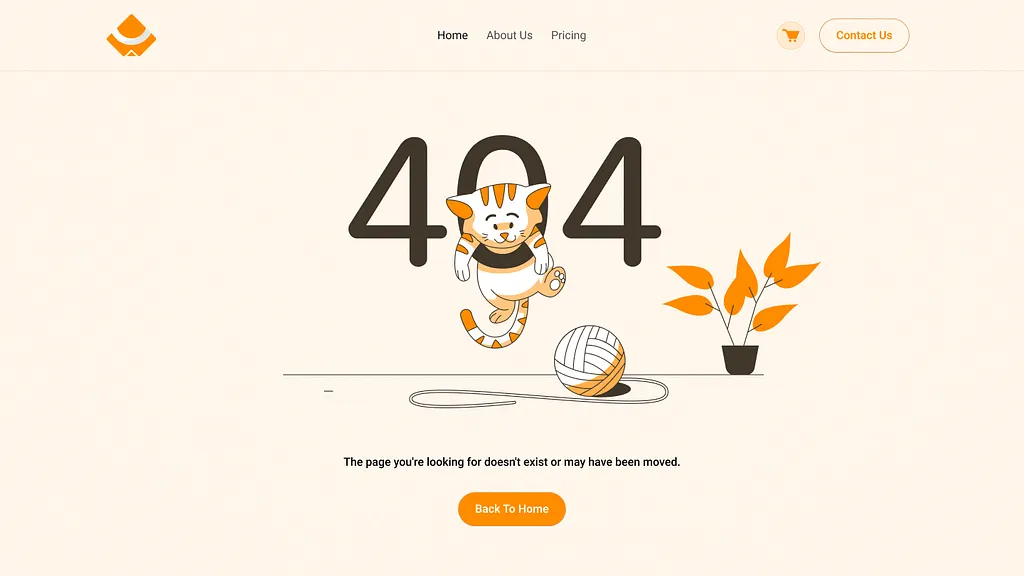
Because without redirects, visitors will see a 404 error page, which means the page cannot be found.
Google also dislikes broken pages because they create a bad user experience. Redirects solve this problem by guiding both visitors and search engines to the correct page.
This helps preserve search rankings and traffic.
A good migration sets up redirects for every important page that changed its URL.
7. Preserve important content
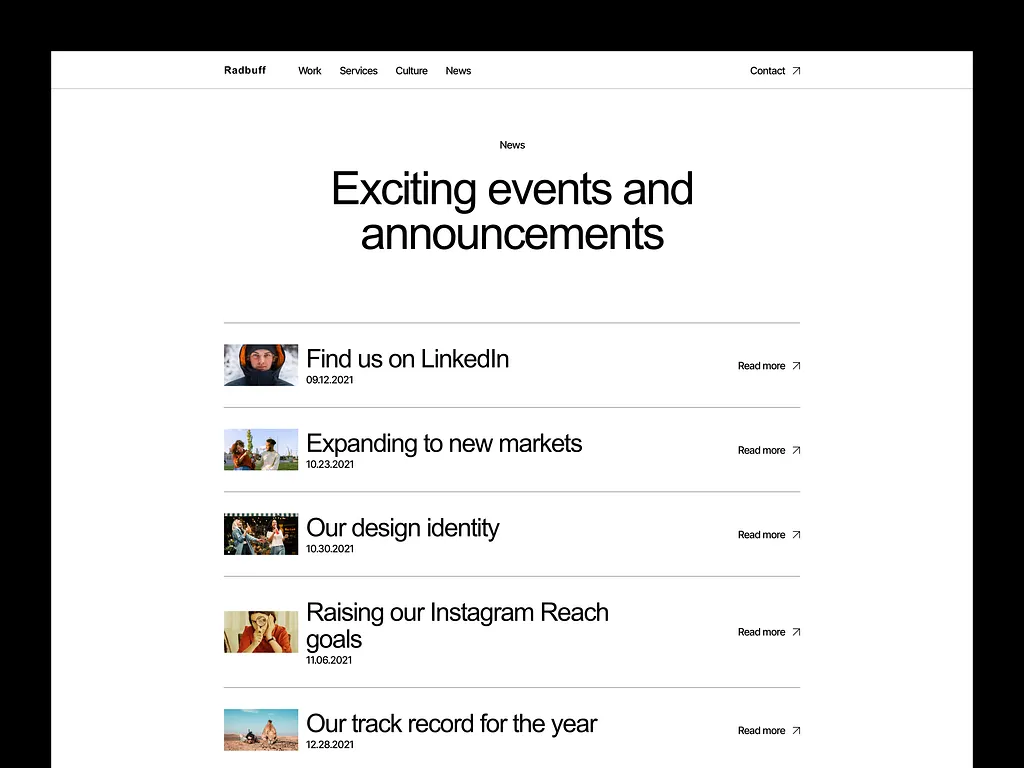
Not every page on a website is equally important.
Some pages bring thousands of visitors from Google every month. Others generate leads, sales, or sign-ups.
During a migration, these pages must be protected carefully. That means keeping the same:
- Content
- Headings
- Keywords
- Internal links
If your team remove or rewrites these pages without care, the rankings they earned on Google may disappear.
For example, a blog post that ranks well might lose its position if the content is shortened or changed too much.
This is why agencies should identify the most valuable pages first and make sure they stay strong after the migration.
8. Maintain the same URL structure (if possible)
A website’s URL structure is the way its pages are organized. For example:
- yourwebsite.com/blog/seo-tips
- yourwebsite.com/blog/content-marketing
If a migration changes too many of these links, it can confuse both Google and visitors.
Search engines have already learned where these pages live. Changing everything at once can temporarily affect rankings.
That is why you should try to keep the same structure whenever possible.
If the blog used to live under “/blog,” it is usually best to keep it there.
Of course, sometimes changes are necessary during a redesign. But when that happens, redirects must be set up carefully.
Keeping the same structure makes the migration much safer because Google can still recognize the website’s pages easily.
9. Update internal links
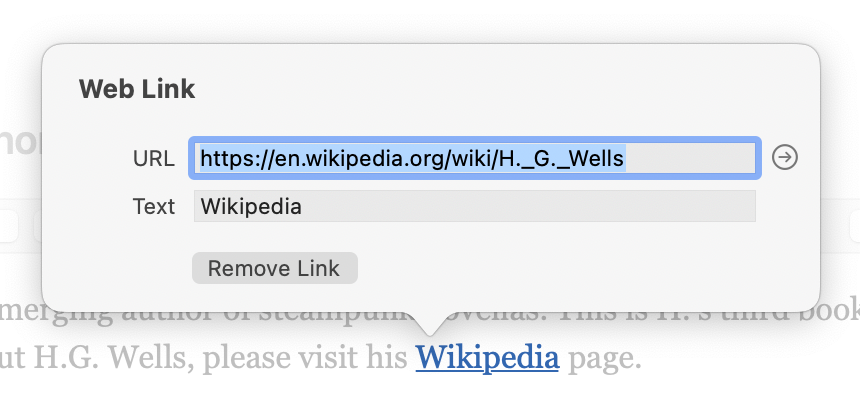
Internal links are the links that connect pages inside the same website.
For example, a blog post might link to a service page or another article.
During a migration, some page URLs may change. If the internal links still point to the old URLs, they may go through redirects or lead to broken pages.
This is why you should update these links after the migration.
Instead of linking to the old page and relying on a redirect, the link should point directly to the new page.
Why does this matter?
Because direct links are faster and clearer for both users and search engines. It also reduces the chances of errors in the future.
Updating internal links helps keep the website organized and ensures visitors move smoothly between pages without confusion or delays.
10. Check canonical tags
Some websites have multiple pages that contain similar or identical content.
To help Google understand which page is the main one, websites use something called a canonical tag.
A canonical tag simply tells Google: “This is the original version of the page.”
During a migration, these tags must be checked carefully. If they still point to old URLs, Google might continue indexing the old pages instead of the new ones.
That can cause search ranking problems.
Your team should review these tags to make sure they point to the correct new pages after the migration.
Think of canonical tags like labels that tell Google which page should be treated as the official version. If the label points to the wrong page, search engines may get confused.
Fixing this helps ensure the correct pages appear in Google search results.
11. Generate a new XML sitemap
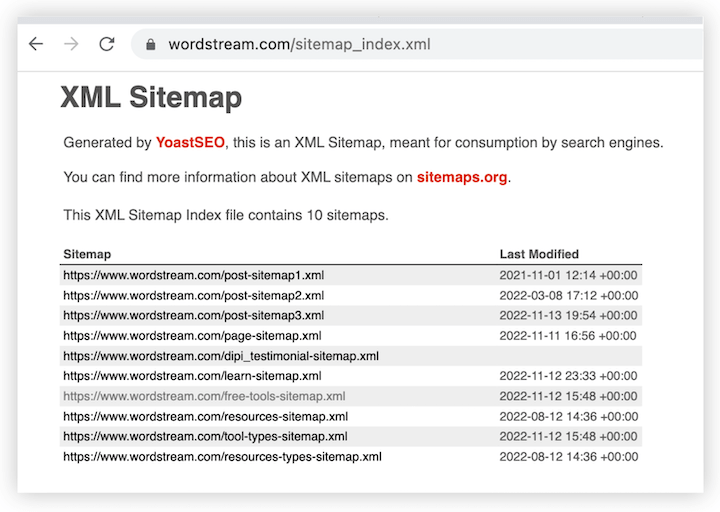
A sitemap is like a map of the entire website. It lists all the important pages so search engines can find and crawl them easily.
After a migration, many page URLs may change. Because of this, the old sitemap may no longer be accurate.
So your team should create a new sitemap that contains only the updated URLs. This sitemap is then submitted through Google Search Console.
Why is this helpful?
Because it tells Google exactly where the new pages are located. Instead of discovering the pages slowly, Google can crawl them faster and update its search results sooner.
12. Update robots.txt
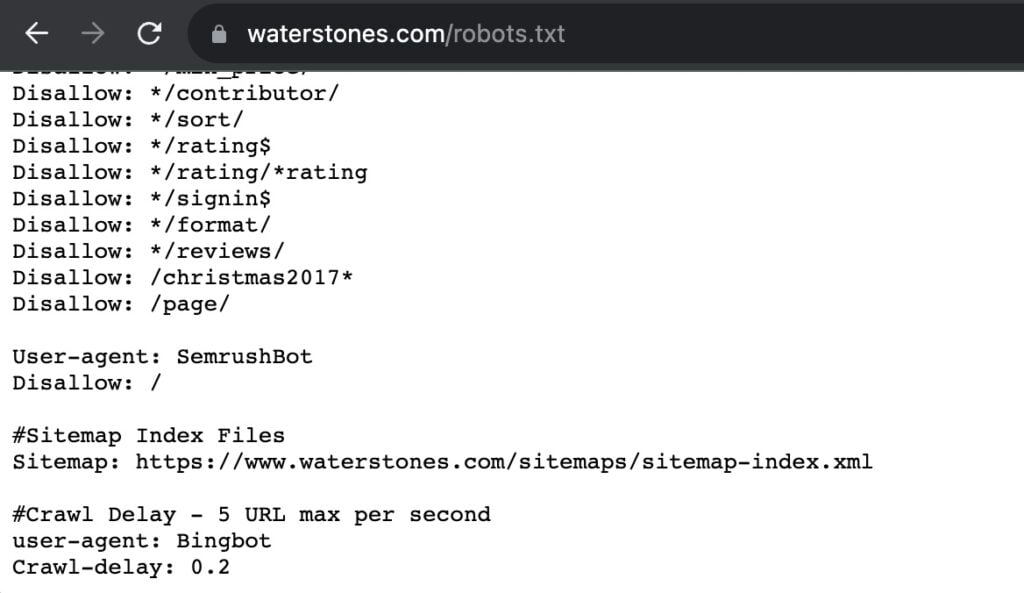
The robots.txt file is a small file on a website that tells search engines which pages they are allowed to visit.
Sometimes developers block pages while working on a redesign to prevent Google from indexing unfinished content.
But if this file is not updated after launch, it might accidentally block important pages. That means Google will not crawl or index them.
Check your site robots.txt file during migration to make sure important parts of the site are open to search engines.
It is a simple step, but forgetting it can hide an entire website from Google.
13. Verify the new site in Search Console
Once the new website is live, it must be connected to Google Search Console. This tool allows your team to see how Google interacts with your website.
For example, it shows:
- Which pages are indexed
- Which pages have errors
- Which search queries bring visitors
Adding the new site to Search Console allows your team to monitor the migration closely.
If something goes wrong, the tool will usually reveal the problem quickly.
Without this step, you’d be guessing about what Google sees.
Connecting your website to Search Console gives clear insights that help keep the migration smooth and successful.
14. Use the change of address tool (for domain migrations)
Sometimes a website moves to a completely new domain.
For example: oldsite.com → newsite.com
When this happens, Google needs to be informed about the move.
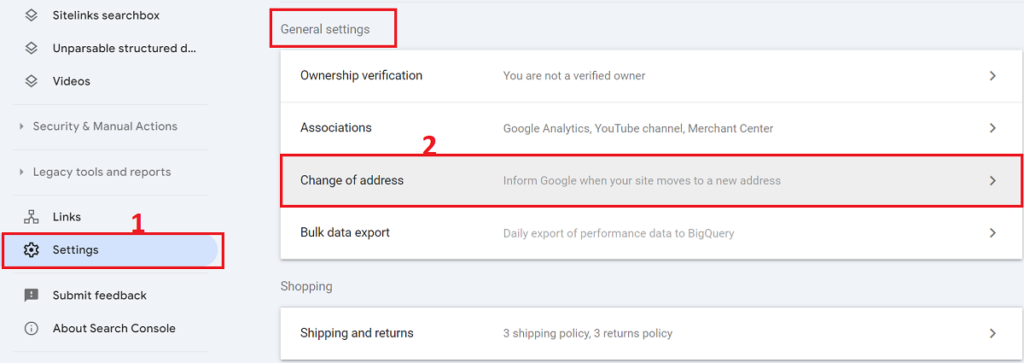
Inside Google Search Console there is a feature called the Change of Address tool.
This tool tells Google that the entire website has moved to a new domain. It helps Google transfer rankings and signals from the old site to the new one.
Without this step, Google might treat the new website as a completely different site, which could slow down rankings.
Using the tool helps search engines understand that the business simply changed its address, not its identity.
15. Test redirects before launch
Before the new website goes live, test all redirects.
Check whether old URLs correctly send visitors to the new pages. Screaming Frog SEO Spider help test this quickly.
One common issue agencies look for is something called a redirect chain. This happens when a page redirects multiple times before reaching the final page.
Too many redirects can slow down the website and confuse search engines.
By testing everything before launch, you ensure visitors will land on the correct pages without problems.
It is like testing all road signs before opening a new highway.
16. Check page speed
Website redesigns sometimes add heavy images, new scripts, or complex layouts. These changes can slow down the site.
Slow websites frustrate visitors and can hurt search rankings.
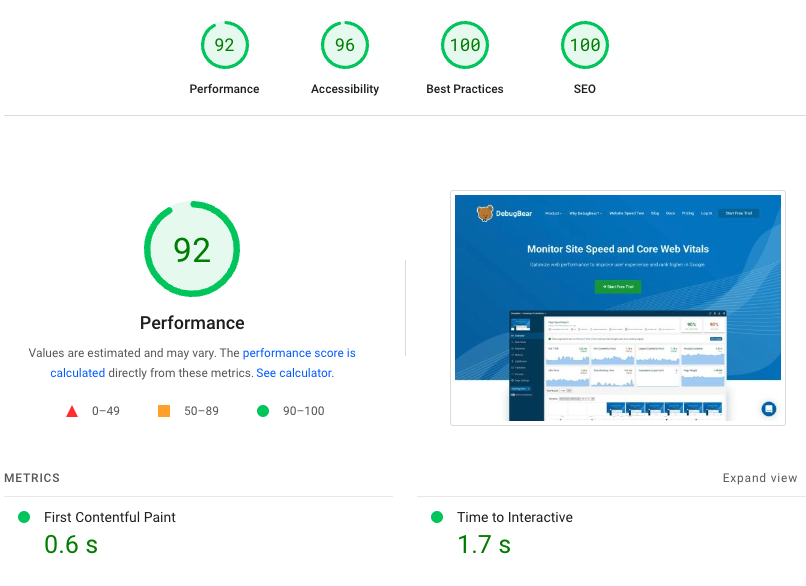
Test page speed using tools like Google PageSpeed Insights. The tool analyzes how fast pages load and suggests improvements.
If the site is slow, your team can compress images, remove unnecessary scripts, or optimize the design.
A fast website improves the user experience and helps keep visitors on the site longer.
17. Verify mobile friendliness
Most people browse the internet on their phones. Because of this, Google now prioritizes mobile-friendly websites.
After a migration, check how your site looks and works on mobile devices. Make sure:
- Text is easy to read
- Buttons are easy to tap
- Pages load quickly
If the mobile experience is poor, rankings can drop.
Testing mobile usability ensures your website works smoothly for visitors using smartphones.
18. Fix broken links
After the new website launches, run another site scan. This helps find problems such as:
- Pages that return 404 errors
- Missing images
- Links that lead to the wrong pages
Screaming Frog SEO Spider can quickly find these issues.
Broken links create a poor experience for visitors and make a website look unprofessional.
Fixing them helps keep the site clean, reliable, and easy to navigate.
19. Monitor indexing after launch
Once the migration is complete, watch how Google indexes your new pages.
Use Google Search Console to see what is happening. Check two main things:
- First, whether the new pages are appearing in Google’s index.
- Second, whether the old URLs are slowly disappearing.
This process takes time, so monitoring is important.
If Google struggles to index the new pages, your team can fix the issue early.
This step helps ensure your website’s search presence stays strong after the migration.
20. Track traffic and rankings for 4–8 weeks
Even if a migration is done correctly, rankings may fluctuate for a short time.
Search engines need time to process the changes. For the next several weeks, closely watch:
- Organic traffic
- Keyword rankings
- Crawl errors
Monitor this data using tools like Google Analytics and Google Search Console.
If traffic suddenly drops or pages disappear from search results, your team should investigates and fix the issue.
Careful monitoring ensures the website fully recovers and continues growing after the migration.
Wrapping up
Migrating a website is not just about moving pages. If you miss a few steps, you can lose rankings, traffic, and leads from Google.
That is why following a clear checklist matters.
And once the move is safe, winning those rankings back is a content job. That is where an SEO content strategy comes in.
If your agency plans to redesign or move a website and you want to keep your SEO safe, Block Agency can help.
We don’t just design websites for agencies. We also help migrate websites the right way so your pages, traffic, and rankings stay protected.
A smooth migration means your new site can grow without losing the results you already worked hard for.
Reach out to us here: hey@blockagency.co
Frequently asked questions
Why is SEO important during website migration?
SEO is important during website migration because search engines already know the old pages. If the move is not handled correctly, search engines may not find the new pages. This can cause traffic and rankings to drop. SEO steps help guide search engines to the new pages.
What are the most common SEO website migration mistakes?
Common SEO website migration mistakes include missing redirects, deleting important pages, changing many URLs at once, blocking pages in robots files, and forgetting to update internal links. These mistakes can confuse search engines and lead to traffic loss after the migration is complete.
How can website traffic be protected during migration?
Traffic can be protected by mapping old URLs to new URLs, adding redirects, keeping important content, and checking internal links. Monitoring performance with Google Analytics also helps detect problems early so they can be fixed before traffic drops.
What types of changes require SEO website migration?
SEO website migration is needed when a website changes its domain name, switches to a new content system, redesigns the site, changes page URLs, or moves from HTTP to HTTPS. These changes affect how search engines find and understand the website, so proper migration steps help keep rankings stable.